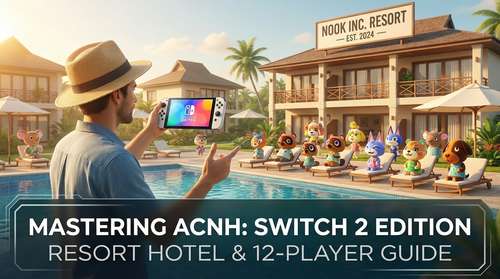
The mid-January launch of the Animal Crossing: New Horizons Switch 2 Edition has breathed fresh life into our island getaways, bringing features fans have requested for years alongside some surprising innovations. With the powerful Nintendo Switch 2 hardware now in the hands of millions, players are diving deep into the massive 3.0 update. While the visual upgrade to stunning 4K resolution is immediately noticeable, it's the new gameplay mechanics that are truly shaking up the meta. From managing the bustling new Resort Hotel to coordinating chaotic Animal Crossing 12 player multiplayer sessions, there is a lot to unpack. In this guide, we provide essential Animal Crossing New Horizons Switch 2 tips to help you navigate these changes and build the ultimate island paradise.
The Resort Hotel Guide: Managing Tourism on Your Island
One of the headline features of the 3.0 update is the Resort Hotel. Managed by Kapp'n's extended family, this building introduces a new dynamic to your island: tourism. While many players love the bustle, the influx of random villagers can disrupt carefully curated island aesthetics. Here is your ultimate ACNH Resort Hotel guide to keeping things under control.
Curating the Crowd with Custom Uniforms
If you are worried about tourists clashing with your island's vibe, head to the hotel lobby immediately. You will find two mannequins near the entrance where you can set "Tourist Outfits." By assigning specific custom designs or thematic clothing sets here, every random visitor who steps off the ferry will don your chosen attire. This is a game-changer for themed islands—imagine a spooky island where every tourist automatically wears a ghost costume, or a citycore island where they all wear business suits.
Controlling Visitor Flow
Tourists tend to wander, but they can be corralled. Savvy island designers have discovered that tourists primarily stick to paved paths. Use this to your advantage by creating specific "tourist loops" that guide visitors from the hotel to the shops and museum, keeping them away from your private residential areas. If you are playing on the Switch 2, utilize the new ACNH island design 4K clarity to place subtle fencing or shrubbery that naturally blocks off restricted zones without looking out of place.
Mastering 12-Player Multiplayer Parties
The Animal Crossing 12 player multiplayer feature is a technical marvel exclusive to the Switch 2's upgraded RAM and processing power, but it hasn't been without its growing pains. Early reports from players described the connection process as a "nightmare" of loading screens, but stability has improved with recent patches. To ensure your massive island party doesn't crash, follow these Switch 2 gaming tricks.
Optimization is Key
Hosting 11 other people puts a significant strain on your network. For the best experience, the host must use a wired LAN connection—thankfully much easier with the Switch 2 dock's improved ethernet port. Additionally, advise your guests to avoid wearing complex custom designs if you are planning a competitive event like a Fishing Tourney or Bug-Off, as rendering twelve unique high-res patterns can cause frame drops even on the new hardware.
The "Slumber Islands" Alternative
If live multiplayer proves too chaotic, the update introduces "Slumber Islands"—collaborative dream addresses where up to 10 friends (on Switch 2) can build together asynchronously. This is perfect for design projects where you don't need everyone online simultaneously. Changes save to a shared cloud state, allowing your friend group to build a masterpiece over weeks without the headache of coordination.
Harnessing Joy-Con 2 Controls for Precision Design
The new hardware isn't just about graphics; the ACNH Joy-Con 2 controls have revolutionized how we design. The new "C" button on the right Joy-Con acts as a dedicated push-to-talk key for the integrated GameChat, making 12-player coordination significantly smoother than the old smartphone app solution.
Mouse Mode for Terraforming
Perhaps the most underrated feature is the Joy-Con 2's pointer functionality. By detaching the Joy-Cons, you can use the right controller as a pointer (similar to a mouse) to drag and drop paths, trees, and furniture in the Island Designer app. This offers a level of precision previously limited to touch controls, but now viewable on your TV in crisp 4K. Mastering this control scheme will cut your terraforming time in half, letting you create intricate patterns that were previously tedious to lay down tile-by-tile.
Quality of Life Updates in Version 3.0
Beyond the flashy new hardware features, the Animal Crossing 3.0 update walkthrough wouldn't be complete without mentioning the quality-of-life improvements available to everyone. Bulk crafting is finally a reality—no more mashing the A button to make fish bait one at a time. Storage has been expanded yet again, which is essential for hoarding the new "collaboration items" introduced this week.
Whether you are fine-tuning your resort's dress code or hosting a dozen friends for a chaotic game of tag, the Switch 2 edition of New Horizons has successfully revitalized the game for 2026. Just remember to keep your internet connection wired and your patience high when that twelfth player tries to join.