The wait for the Nintendo Switch 2's definitive launch title is finally over—or at least, it is if you know the right tricks. Pokémon Pokopia has arrived, bringing a cozy yet mysteriously post-apocalyptic twist to the franchise. As players step into the shoes of a shape-shifting Ditto in a ruined Kanto wasteland, they are discovering a survival-crafting loop that blends Animal Crossing creativity with Minecraft utility. If you are itching to start rebuilding the world before the official March 5 release in your region, we have the confirmed steps to get you in right now.
How to Play Pokémon Pokopia Early (New Zealand Trick)
As of right now, Pokémon Pokopia is live in New Zealand and Australia. Because the Nintendo Switch 2 remains region-free like its predecessor, you can bypass the regional time lock and start your adventure immediately. This "New Zealand trick" is the standard method for playing global releases early, but the new Switch 2 eShop interface adds a few minor steps.
Step-by-Step Unlock Guide
- Create a New Nintendo Account: Go to the official Nintendo website and register a new account. Crucially, set the Country/Region of Residence to "New Zealand."
- Add a New User on Switch 2: On your console, go to System Settings > Users > Add User. Link the new New Zealand account you just created.
- Access the NZ eShop: Open the eShop using the new user profile. You will see the New Zealand storefront where Pokémon Pokopia is already available for purchase/download.
- Fund Your Wallet: Most international credit cards will not work directly on the NZ eShop. You will need to purchase New Zealand Nintendo eShop gift cards (NZD) from a reputable third-party key site (like Play-Asia or G2A) and redeem the code in the eShop.
- Download and Play: Once purchased, the game will download. You can play it immediately using your NZ account, and once it launches in your actual region, you can switch back to your main profile to continue your save data.
5 Essential First-Day Tips for Pokémon Pokopia
Once you drop into the desolate landscapes of Pokopia, the game doesn't hold your hand. The tutorial with Professor Tangrowth is brief, and many mechanics—specifically Pokopia move-copying mechanics—are left for you to discover. Here are the five most critical tips to master on day one.
1. Master the Ditto Move-Copying System
Your protagonist is a Ditto in human disguise, and this isn't just cosmetic. To interact with the world, you must copy abilities from wild Pokémon. However, this is governed by a strict PP Meter (the blue curved bar at the bottom right).
For example, copying a Machop allows you to use Rock Smash to break construction blocks, while a Squirtle might grant Water Gun for farming. Crucial Warning: If your PP hits zero, your Ditto form destabilizes, causing "Transformation Fatigue" which drastically slows your movement speed for 2 minutes. Always carry Ether Berries or rest at your camp to replenish PP before heavy construction work.
2. The "Vacuum" Loot Mechanic
Forget picking up items one by one. Early in the game, you will unlock a "Vacuum" ability (reminiscent of Kirby) that allows your Ditto form to inhale loose resources. This is essential for clearing the debris of the Kanto wasteland efficiently. When you break a tree or rock, hold the action button to suck up all wood and stone instantly. Upgrading your lung capacity should be your first priority at the crafting bench to carry more stacks.
3. Habitat Building 101: The Azurill Example
Spawning Pokémon in Pokopia isn't random; it is architectural. You must build specific habitats to attract species. The game hints at this, but doesn't explain the "adjacency bonuses."
For example, to attract an Azurill early on, you can't just place water. You need to place a Water Source block adjacent to a Toy Box item. The combination of "Play" and "Water" tags triggers the spawn. Check your "Habitat Guide" in the menu, which fills in as you experiment with block combinations. If a region remains empty, try adding more specific decor items related to the Pokémon's type.
4. Don't Ignore Professor Tangrowth's Requests
The only remaining "scholar" in this post-human world is a Tangrowth wearing a tattered lab coat. While it is tempting to run off and build a castle, Tangrowth's questline is the only way to unlock key tools like the Terraforming Shovel and the Joy-Con 2 Mouse Mode (which makes placing blocks significantly faster). Complete his "Ecological Surveys" first; they usually involve taking photos of restored ruins or finding specific old-world artifacts like the "Ancient PC."
5. The Map is an Inverted Kanto
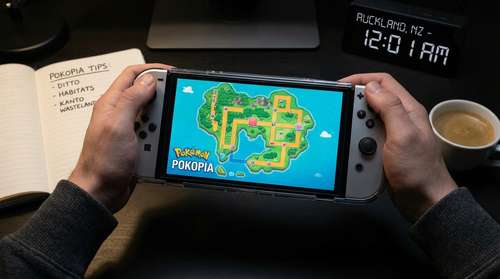
One of the biggest Pokémon Pokopia secrets players are discovering is the map layout. If you look closely at the in-game map, it is actually the Gen 1 Kanto map turned upside down. This is vital for navigation. If you are looking for Fire-type habitats, head to what would be Cinnabar Island (now a volcanic crater in the North). Need Ghost types? Look for the ruins of Lavender Town in the Southwest. Using your knowledge of Red/Blue geography will help you locate rare biomes much faster than exploring blindly.
Performance Note: Switch 2 Enhancements
Playing on the new hardware, Pokopia runs at a crisp 4K 60fps when docked. If you are playing handheld, the game utilizes the Switch 2's new haptic triggers to simulate the resistance of materials when you are copying moves like Cut or Dig. It is a subtle touch that adds immersion to the resource gathering grind.