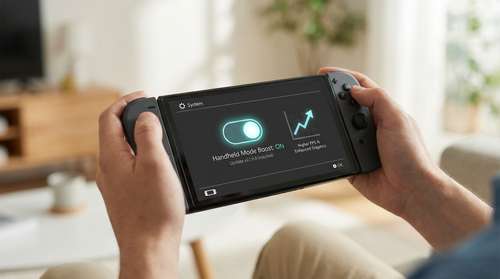
On March 20, 2026, Nintendo caught the gaming community completely off guard with the unexpected release of the Switch 2 system update v22.0.0. While firmware patches typically focus on minor stability tweaks behind the scenes, this massive drop delivered a specific feature players have spent years heavily requesting. The new Nintendo Switch 2 Handheld Mode Boost fundamentally transforms how legacy software operates on the go. By forcing original Switch titles to utilize the system's robust TV-mode clock speeds while completely undocked, fans can now tap into a massive reserve of processing power previously locked away. If you want to experience your older library with enhanced visual fidelity and noticeably smoother action, mastering this new setting is absolutely essential.
Unlocking Switch 2 Backwards Compatibility Performance
For the entirety of the last hardware generation, portable players accepted a heavy compromise. The original hybrid console deliberately throttled performance in portable play to preserve battery, dropping native resolutions down to 720p and frequently struggling to maintain consistent frame pacing. The Nintendo Switch 2 Handheld Mode Boost bypasses that old limitation entirely. When activated, the operating system essentially tricks older legacy games into believing the console is resting comfortably in its dock connected to a television display.
This software workaround yields spectacular results for Switch 2 backwards compatibility performance. Because the new hardware features a gorgeous built-in 1080p display, older games that previously used dynamic resolution scaling can now push out a crisp, native 1080p image directly on the portable screen. Furthermore, titles infamous for significant slowdowns—like sprawling open-world adventures or dense, effects-heavy action RPGs—now routinely hit their intended target caps. Players are already reporting drastically better framerates in Switch games on Switch 2, transforming ambitious titles that once stuttered into locked, seamless 60fps experiences.
How to Enable Boost Mode on Switch 2
Despite its immense value to the hardcore gaming audience, Nintendo deliberately decided not to turn this feature on by default out of the box. You will need to manually dig into your console's menus to flip the switch. Fortunately, figuring out how to enable boost mode Switch 2 is a straightforward process once you know exactly where to look.
First, boot up your console and select the standard gear icon from the Home Screen to open your System Settings. Scroll all the way down the left-hand menu until you reach the "System" tab. From there, navigate down the right-hand options until you locate a submenu specifically labeled "Nintendo Switch Software Handling". Inside this menu, you will find the dedicated toggle for "Handheld Mode Boost". Simply click the prompt to activate it. Keep in mind that this adjustment only affects backward-compatible titles from the previous generation; native modern software manages its own power profiles automatically and remains completely unaffected by this specific toggle.
Managing Handheld Mode Boost Battery Life and Quirks
Unleashing docked-level power on a compact portable device comes with inevitable trade-offs. The most immediate and noticeable impact you will experience involves Handheld Mode Boost battery life. Because the system's internal processor is aggressively ramping up its clock speeds to render higher resolutions and stabilize frame pacing, power consumption spikes significantly. Depending on the specific software you are currently running, overall playtime on a single charge can drop substantially, meaning you will be reaching for your charger far more often.
Beyond the simple power drain, tricking the software into a forced television state creates a few notable hardware quirks. The console essentially disables its touch screen functionality entirely because original docked games never expected touch inputs while resting across the room. Additionally, the system will recognize your physically attached Joy-Con 2 gamepads as a single wireless Pro Controller. This means any legacy title that strictly requires detached controllers or heavily relies on touch-based swiping gestures will fail to operate correctly until you dive back into the settings, disable the boost, and play the game as originally intended.
Essential Nintendo Switch 2 Tips and Tricks for Legacy Games
Maximizing your new hardware means knowing exactly when to utilize these raw horsepower increases. One of the best Nintendo Switch 2 tips and tricks you can implement is curating a specific mental list of games that actually benefit from the upgrade. A simple 2D pixel-art platformer or text-heavy visual novel already runs perfectly at base portable settings. Turning on the boost for these lighter titles merely wastes your battery capacity for absolutely zero tangible graphical return.
Instead, reserve the toggle for demanding 3D environments where performance matters most. If you plan on diving into heavy legacy titles during a long commute or flight, bringing a high-capacity power bank is highly recommended to properly offset the rapid battery drain. Finally, remember to quickly toggle the setting back off before launching motion-centric party games or touch-heavy puzzle titles that might conflict with the Pro Controller override. By aggressively managing when the boost is active, you get the absolute best of both worlds: premium docked visual fidelity when you truly need it, and long-lasting, efficient battery life when you do not.