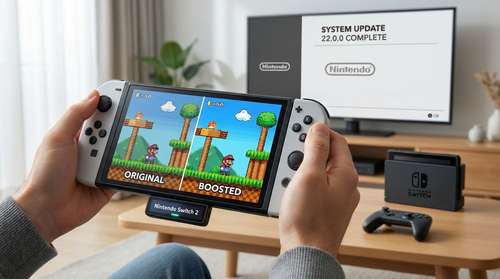
The highly anticipated Nintendo Switch 2 system update has officially arrived, bringing a game-changing feature for players who heavily rely on portable play. Released globally on March 16, 2026, version 22.0.0 introduces the Handheld Mode Boost, a massive upgrade that allows original Switch titles to run with docked-level graphics while you are on the go. Beyond this incredible portable gaming performance boost, the patch delivers enhanced storage management for microSD Express cards, native GameChat improvements, and a new private note-taking system for your Friend List.
What is the 'Handheld Mode Boost' on Switch 2?
During the previous console generation, the original Switch featured a 720p display. As a result, most games natively output at 720p in portable mode and scaled up to 1080p only when docked to a television. Because the Switch 2 hardware boasts a crisp, built-in 1080p screen, playing non-upgraded legacy titles left a noticeable gap in visual clarity.
The new Handheld Mode Boost brilliantly solves this issue. When activated, it essentially tricks compatible Switch 1 software into thinking it is running in TV Mode, even when completely untethered. This forces the software to output at a higher resolution, matching the newer 1080p display and maximizing Nintendo Switch 2 backward compatibility. Games instantly look sharper, and in many cases, players will experience a noticeable performance uplift.
How to Enable the Feature
Nintendo has opted to keep this feature turned off by default. To take advantage of the upgraded visuals, you must manually enable it. Navigate to your console's System Settings, scroll down to System, and select "Nintendo Switch Software Handling". From there, you can toggle the boost setting on or off depending on your preference.
The Trade-Offs: Battery Life and Touchscreen Quirks
While making legacy games look gorgeous is a welcome addition, running software in a forced TV Mode comes with a few technical compromises. Most notably, pushing higher resolutions requires more juice, meaning your system will consume more power and drain the battery faster than normal.
Because the game believes it is sitting in a dock, it will also disable touchscreen functionality. Furthermore, the attached Joy-Con 2 controllers are treated by the software as a Switch 2 Pro Controller. You might encounter incorrect on-screen button prompts or instructions that fail to operate as intended. Certain titles that rely heavily on touch or specialized motion controls are not supported under this boosted setting.
Expanded Switch 2 GameChat Features and Storage Management
Social connectivity received a significant tune-up in Switch 2 firmware 22.0.0. The updated Switch 2 GameChat features now allow users to seamlessly invite friends directly into active voice rooms. If a friend hasn't completed their initial GameChat setup, they can still receive an invitation to join the fun. The visual quality of shared game screens within an expanded GameChat window has also been noticeably refined.
Managing your massive digital library is also much easier. The operating system now provides a detailed breakdown of storage capacity sorted by data type, applicable to both the internal system memory and your expanded microSD Express cards.
In a highly requested quality-of-life upgrade, you can now attach private notes to individuals on your Friend List. Whether you need to remember where you met a specific player or what time zone they live in, these notes remain completely invisible to the other person. You can even edit them on the go using the Nintendo Switch App, provided it is updated to version 3.3.0 or higher.
Highlights from the Nintendo Switch 2 Patch Notes
The full Nintendo Switch 2 patch notes reveal several other welcome tweaks to the user experience, particularly concerning accessibility and media handling. Navigating the eShop and News sections is smoother thanks to newly added media controls, allowing you to rewind or advance full-screen videos by 10 seconds using the ZL and ZR buttons.
Content creators and screenshot enthusiasts also get a bump in functionality. The firmware adds new options for "Automatic Uploads" from your Album, letting you automatically sync clip videos, videos saved as screenshots, and screenshots with added text directly to your smart device.
Accessibility sees major improvements as well. Text-to-Speech can now read text within the Album application and during the console's first-time setup process. Additionally, Portuguese (Portugal) and Russian have been added to the GameChat Voice-to-Speech text translation tools.
Audiophiles will appreciate the new ability to perform a dedicated audio test when "Linear PCM 5.1 Surround" is selected for TV Sound. Furthermore, parents get peace of mind with a new feature that sends push notifications to the Nintendo Switch Parental Controls app whenever a PIN is successfully entered on the console. Finally, the UI has been refreshed with new on-screen text and animations that trigger whenever you load a virtual game card from the HOME Menu, giving the digital interface a slightly more tactile feel.