Following its highly anticipated April 7 debut, Bethesda's epic RPG has finally opened its universe to PlayStation 5 players. Paired with the colossal 'Free Lanes' update and the premium Terran Armada DLC, the game has been fundamentally transformed. However, as the community discovered over a massive opening weekend—prompting Bethesda to announce a crucial performance hotfix on April 13 to address unexpected console crashes—navigating this revised galaxy requires an entirely new set of strategies. Whether you are jumping in for the first time or returning to a totally overhauled experience, our Starfield PS5 tips will help you dominate the Settled Systems.
1. Master the Starfield Manual Flight Controls in Cruise Mode
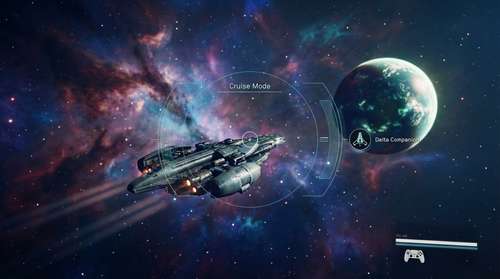
A massive focus of any comprehensive Starfield Free Lanes guide is the newly introduced 'Cruise Mode.' For years, fans begged for seamless space travel instead of navigating through endless fast-travel menus. Bethesda finally delivered.
Engage your Starfield manual flight controls to zip through star systems in real-time. As you approach a planet, the gravitational pull will slightly draw your ship in, creating a highly cinematic transition. While your vessel is locked on a trajectory, get out of the pilot seat. You can craft items, manage your newly shared outpost storage, or interact with your crew. Keep an eye out the windows for dynamic anomalies and derelict ships—these randomly generated encounters are prime spots for high-tier loot.
2. How to Get Xtech Starfield and Roll Tier 4 Exotics
Xtech is arguably the most valuable new resource added to the game's economy. If you find yourself constantly wondering how to get Xtech Starfield, your best bets are looting boss chests at the end of planetary dungeons, defeating high-level legendary enemies, or investigating the space anomalies that pop up during Cruise Mode.
Once you secure this mysterious material, take it to a workbench. Xtech allows you to reroll legendary modifiers on your weapons and armor. You get five rerolls per item; if RNG isn't in your favor, the fifth attempt allows you to handpick exactly what you want. Be on the lookout for the new Tier 4 Exotic perks, such as Bloodthirsty (which grants bonus health on kills) and Kismet (a 25% chance to triple your magazine size upon reloading). You can also use Xtech to push your gear into the brand-new Superior and Exceptional quality tiers.
3. Pinpoint the Starfield Delta Companion Location
If you picked up the new story expansion, finding the Starfield Delta companion location should be at the top of your to-do list. Delta isn't your typical goody-two-shoes Constellation member. This reprogrammed combat robot is morally gray—think Mass Effect's Legion mixed with a ruthless mercenary edge—making him perfect for piracy or rogue playthroughs.
To recruit him, you must initiate the DLC questline by listening to an SSNN broadcast in a major hub like New Atlantis. This kicks off the "Attack of the Terran Armada" quest, eventually leading you to the Nirvana system. You will meet Delta during the "Lost Luxury" mission aboard a ruined cruise ship. Stick with him, upgrade his specific combat modules, and you'll eventually earn the "Worthy Captain" achievement.
4. Expand Your Base with the Starfield Outpost Pets Guide
Base building received massive quality-of-life improvements this month, most notably the addition of shared storage containers that link across all your planetary settlements. However, the standout feature for dedicated space architects is the new fauna system. A proper Starfield outpost pets guide wouldn't be complete without mentioning the bizarre but adorable Milliwhale.
You can acquire the Milliwhale enclosure via the updated outpost building menu. Not only do these creatures add much-needed life to barren asteroid bases, but they also interact dynamically with your crew members. Pairing them with the new Model G robot companion (recruitable in the New Atlantis Well) turns an empty mining facility into a bustling home.
5. Survive the Dynamic Terran Armada Walkthrough Incursions
For those diving into a full Starfield Terran Armada walkthrough, be warned: the new robotic enemies do not politely wait for you at designated quest markers. The Free Lanes update introduced dynamic incursions. These ruthless United Colonies and Freestar Collective remnant robots can literally pull your ship out of Cruise Mode mid-flight.
Always ensure your ship's deflector shields and weapon systems are fully powered using the new Ship Optimisation Terminal before initiating long-haul interplanetary flights. If you are ripped out of warp, prioritize targeting the enemy engines to disable their mobility before they swarm your vessel.
6. Utilize the Moon Jumper for Planetary Exploration
The introduction of the Moon Jumper land vehicle fundamentally changes how you approach planet surfaces. Instead of boosting slowly across craters, deploy your vehicle from the landing bay to rapidly reach the newly added Points of Interest (POIs). Use its vertical boost capabilities to scale mountains and hunt down the new "Colony War Action Hero" collectibles scattered across the map, each of which provides a permanent stat buff.
7. Optimize PS5 Performance and Await the Hotfix
While the PS5 launch has brought an influx of new explorers, the opening weekend was marred by widespread freezing issues. Bethesda publicly acknowledged these PS5 crashing problems on April 13 and confirmed a hotfix is dropping later this week.
Current Stability Workaround
Until the patch goes live, community members have discovered a few ways to mitigate the issues. Avoid rapidly flipping through your inventory menus during auto-saves. Furthermore, taking advantage of the DualSense controller's adaptive triggers is fantastic, but the light bar tracking your ship's integrity can sometimes desync during heavy combat. If the game begins to stutter, sitting in your ship's pilot seat without inputting commands for a few moments can help stabilize the engine's memory load during intense Cruise Mode travel.