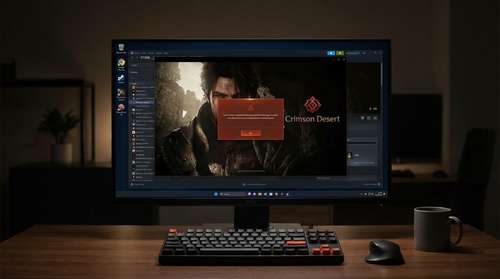
The highly anticipated open-world epic has officially arrived, but finding a reliable Crimson Desert Steam fix has quickly become the top priority for thousands of PC gamers. Released on March 19, 2026, developer Pearl Abyss's massive medieval-fantasy adventure is drawing immense praise for its groundbreaking visual fidelity. However, the excitement surrounding the continent of Pywel has been significantly dampened by widespread technical issues. Players are encountering a crippling corrupt file error Steam bug that prevents the game from launching entirely.
It is a frustrating juxtaposition. On one hand, the industry is celebrating a monumental achievement in game design; on the other, paying customers are locked out of their purchase. As forums flood with complaints, we are breaking down exactly what is happening, why the engine is crashing, and the steps you can take to bypass the errors and get into the game.
A Next-Gen Benchmark: Crimson Desert Graphics Review
Before addressing the technical hurdles, it is impossible to ignore what Pearl Abyss has achieved when the game actually runs. In our comprehensive Crimson Desert graphics review, the proprietary BlackSpace Engine emerges as the undeniable star of the show. Players take on the role of Kliff, a seasoned warrior of the Greymanes faction battling the rival Black Bears. What sets this title apart from the crowded pack of RPG release dates 2026 is its unparalleled environmental realism and visceral combat mechanics.
Revolutionary Water Tech and Ray Tracing
The dynamic water simulation is nothing short of an engineering marvel. Utilizing Fast Fourier Transform (FFT) ocean rendering and complex Shallow Water Equations, the engine simulates up to 250,000 individual water particles that react organically to terrain boundaries and physical collisions. Whether you are crossing a shallow stream or standing by a cascading waterfall, the fluid dynamics set a new industry standard. Combined with meticulous raytraced global illumination and indirect specular lighting, the atmospheric conditions make every region feel incredibly alive.
The Elephant in the Room: Crimson Desert Launch Bugs
Unfortunately, experiencing these cutting-edge visuals requires getting past the title screen—a monumental task for many early adopters. The most prominent of the Crimson Desert launch bugs is an aggressive crash immediately upon booting the application. Users are met with a vague "corrupt file" message, forcing the client to close before the main menu even loads.
The latest Pearl Abyss Crimson Desert news confirms that the developer is actively investigating the crisis. The core issue appears to stem from a direct conflict between the custom architecture of the BlackSpace Engine and recent GPU driver updates from major hardware manufacturers. Because the engine leverages heavy hardware-accelerated ray tracing and unique physical simulation models, slight discrepancies in driver instruction sets are triggering false file corruption flags within Steam's validation process.
Navigating the Crimson Desert PC Requirements and Fixes
While an official patch is currently in the works, the PC gaming community has discovered several workarounds to bypass the corrupt file error Steam problem. If your journey with the Greymanes is currently on hold, try these immediate troubleshooting steps to stabilize your client.
First, ensure your system actually meets the stringent Crimson Desert PC requirements. The game is extraordinarily demanding. Hardware tests show that achieving smooth performance at high settings requires robust hardware, with setups like an AMD Ryzen 5950x and an RTX 3080 Ti sitting right between the recommended High and Ultra presets. Failing to have a fully compatible, hardware-accelerated ray tracing GPU can trigger unexpected launch failures.
Implementing the Driver Rollback Strategy
If your hardware is up to the task, the most successful workaround involves manipulating your graphics drivers.
- Roll Back GPU Drivers: Since the crash is linked to the latest updates conflicting with the BlackSpace Engine, reverting to the previous month's stable driver version has successfully allowed many players to boot the game.
- Verify Integrity of Game Files: After rolling back your drivers, open your library, right-click the game, and select this option. It forces the client to re-examine the directory and clear the false corruption flags.
- Disable Overlays: Temporarily turning off the Steam Overlay and third-party frame generation tools can provide the stability needed to reach the main menu.
Patience Rewarded in Pywel
Launch day woes are unfortunately common in modern AAA development, but the sheer ambition on display here makes the wait worthwhile. The developer's transition from multiplayer-focused titles to a massive single-player narrative is an artistic triumph. Once Pearl Abyss irons out these critical driver conflicts, Kliff's sprawling adventure will undoubtedly stand as a monumental achievement in interactive entertainment. If you are willing to navigate the temporary technical headaches, you will find a world that redefines the visual possibilities of the genre.