When the Switch 2 hit shelves last year, players spent months speculating about the mysterious extra input on the right controller. Now that the calendar has turned to April 2026, that input is at the center of a lucrative new promotion. If you are looking for a definitive Nintendo Switch 2 C Button guide, you are in the right place. Nintendo is actively handing out 100 My Nintendo Platinum Points and access to exclusive custom user avatars to any active subscriber who interacts with the console's integrated communication app.
The catch? The free trial period for the communication software officially expired on April 1, 2026. The service is now locked behind the Nintendo Switch Online (NSO) paywall. To remind gamers that the feature exists and to soften the blow of the newly instituted premium requirement, the Kyoto-based gaming giant has rolled out a limited-time incentive. By taking a few seconds to boot up the software, players can easily claim their bounty.
How to Get Free Platinum Points Switch 2 Owners Can Claim Right Now
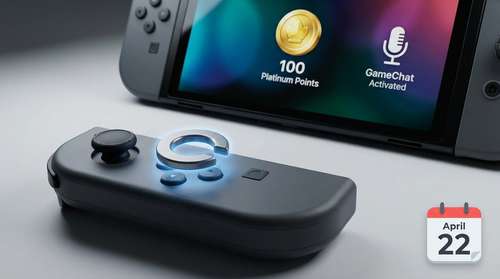
Securing your Switch 2 GameChat free rewards is incredibly straightforward, but the window of opportunity is closing fast. The current promotion runs strictly until April 22, 2026, at 5:59 PM PT. You do not need to actively jump into a long voice call or initiate a complex screen-sharing session with friends to trigger the mission payout.
If you are wondering exactly how to get free Platinum Points Switch 2 users are actively farming this week, follow these steps:
- Ensure your console is connected to the internet and your Nintendo Switch Online subscription is active.
- Simply press the C Button located on your right Joy-Con 2 controller.
- Wait for the GameChat application menu to fully load on your screen.
- Navigate to the My Nintendo Missions tab on your dashboard to see your 100 Platinum Points automatically deposited.
For players using third-party controllers or legacy gamepads that lack the dedicated input, the software can still be accessed directly through the standard HOME menu by tapping the designated chat app icon.
Completing the Switch 2 Profile Icon Mission 2026
Once you have your 100 points safely in your digital wallet, it is time to spend them. The primary draw of this April event is the Switch 2 profile icon mission 2026 drop, which features a slick lineup of 13 custom elements designed specifically around the app's aesthetic.
These limited-edition avatars cost 10 Platinum Points apiece. Because the promotion hands you exactly 100 points, you can instantly purchase 10 out of the 13 available designs. Completionists aiming to secure the entire set will need to bridge the 30-point gap by finishing a few regular My Nintendo weekly missions, such as playing a classic SNES title or backing up save data to the cloud.
It is worth noting that you cannot bypass the app to buy these elements. While you can view the new drops through the standard NSO app, the transaction requires you to have authenticated your account via the chat interface first. You do not even have to invite a single friend to a lobby; just opening the interface satisfies the system's requirements.
Joy-Con 2 C Button Tutorial: Maximizing the App's Potential
While the immediate appeal is the free currency, mastering the hardware is essential for anyone paying the annual NSO fee. This Joy-Con 2 C button tutorial goes beyond a quick cash grab. When utilized properly, the input serves as a universal social hub.
Pressing the button acts as a system-level overlay, instantly suspending your current gameplay to manage your party. For active subscribers, it opens a Discord-style dashboard where up to 12 participants can hang out simultaneously using the console's built-in microphone. From there, you can launch into one of the system's most impressive technical feats: live screen broadcasting. Up to four players can broadcast their gameplay feeds directly to the party at the exact same time.
If you connect a compatible USB camera to the dock, the software even supports face-to-face video calls. However, players without an active NSO subscription will find the button significantly less useful. For non-subscribers, pressing it simply triggers a promotional splash screen advertising the benefits of the paid online ecosystem.
Exploring Other Nintendo Switch 2 Hidden Features
Nintendo has historically packed its hardware with obscure secrets, and the latest generation is no different. The chat application represents just one of several Nintendo Switch 2 hidden features that the community is still uncovering.
Beyond its primary function of gathering your squad for a round of Mario Kart World or coordinating tactics in Splatoon, the dedicated social button is rumored to have deeper integration in upcoming titles. Dataminers have recently hinted that future firmware updates might allow users to remap the button for specific in-game camera controls or accessibility shortcuts, though Nintendo has yet to officially confirm any custom remapping functionality.
For now, the mandate from Nintendo is clear: they want you socializing, and they are willing to pay you in digital currency to start. With the April 22 deadline approaching quickly, booting up your console and pressing that extra controller input is arguably the fastest payout the My Nintendo program has ever offered.