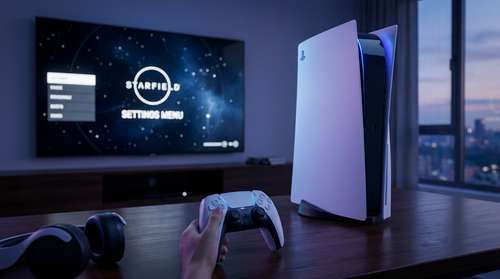
Bethesda’s massive sci-fi RPG finally touched down on Sony consoles on April 7, 2026, bringing nearly three years of refinements, expansions, and a completely overhauled travel system to a new audience. If you are diving into the Settled Systems for the first time, getting a handle on the game’s vast mechanics can feel like jumping into a grav drive without coordinates. Finding the right Starfield PS5 tips and tricks is crucial to saving time and ensuring a smooth journey across the galaxy. With the massive Day 1 drop of the Free Lanes update alongside the PlayStation release, the game has evolved significantly from its original 2023 iteration. Whether you want to know how to set up your display or which background to pick, this comprehensive primer covers everything you need.
Starfield PS5 Best Settings Guide and Performance
When booting up the game, prioritizing your visual and framerate configuration is the most critical first step. For console players, navigating a Starfield PS5 optimization walkthrough guarantees you are getting the absolute most out of your hardware.
Unlocking the Starfield 60 FPS Performance Mode PS5
To experience buttery-smooth gunplay and planetary exploration, you will want to activate the Starfield 60 FPS performance mode PS5 option immediately. Navigate to the Display settings menu and toggle the graphics preference from Visuals to Performance. This adjusts the dynamic resolution and scales back some volumetric lighting, but guarantees a stable 60 frames per second during intense firefights and busy hub cities like New Atlantis. If you are playing on a VRR-compatible display or the PS5 Pro, you can even uncap the framerate, allowing the game to hit numbers well above 60 FPS during indoor dungeon crawling. Make sure to toggle the new "Always Show Landing Camera" option on as well—a highly requested feature introduced in the recent patch that drastically boosts immersion by showing your ship touching down at known locations.
Maximizing Starfield DualSense Haptic Feedback Features
One of the most exciting additions to the PlayStation port is the native integration of the DualSense controller. To fully utilize the Starfield DualSense haptic feedback features, ensure your controller vibration intensity is set to "Strong" in the PS5 system menus.
Bethesda has programmed distinct tactile sensations for nearly every action. You will feel the heavy mechanical thud of your ship’s landing gear touching down on barren moons, and the subtle directional rumble of enemy footsteps creeping up behind you in abandoned outposts. Adaptive triggers also play a massive role; mining lasers require a persistent, heavy squeeze, while ballistic weapons feature individual trigger kicks that match their fire rates. It transforms the moment-to-moment gunplay and makes the physical act of exploring alien worlds incredibly engaging.
The Ultimate Starfield Free Lanes Update Guide
PlayStation 5 players are getting the most polished version of the game, launching simultaneously with Bethesda’s largest free content drop yet. Following a Starfield Free Lanes update guide is essential, as this patch radically changes how you travel and build.
Cruise Mode and Outpost Building
Gone are the days of constant menu-hopping. The Free Lanes update introduces Cruise Mode, allowing you to manually fly your ship through open space between planets within a star system. You can even set an autopilot to handle navigation while you walk around your ship's interior, managing your inventory or interacting with your crew.
For builders, outpost management is vastly improved. The update added Shared Containers, which seamlessly link resources across different outposts, drastically reducing inventory clutter. Furthermore, placing weapons workbenches is now much easier, and the addition of the new Database menu keeps all your recipes and favorite planetary locations organized. Do not forget to build a display case for the new Colony Wars Action Heroes you discover scattered across the universe!
Starfield Best Starting Traits for Beginners
Character creation is your first true hurdle, and picking the right background sets the tone for your entire playthrough. When looking at the Starfield best starting traits for beginners, there are three absolute standouts you should consider.
First is "Kid Stuff." This trait means your parents are alive and living in New Atlantis. While you send them a small percentage of your credits weekly, they randomly gift you incredibly powerful gear early in the game, including a unique spaceship and customized armor. It is an amazing return on investment.
Second, consider "Wanted." Armed mercenaries will occasionally ambush you, but the perk grants you a massive damage boost when your health is low. More importantly, those attacking mercenaries deliver free loot and easily hijackable ships right to your doorstep.
Lastly, "Taskmaster" is brilliant for players looking to dive deep into the new X-Tech ship crafting system. It occasionally allows your crew to automatically repair your ship to full health during space combat, saving you precious resources while you experiment with the new buildable Ship Optimization Terminals.
Essential Day 1 Combat and Crafting Tips
With your settings locked and your traits selected, surviving the early hours of the game comes down to resource management. Keep an eye out for the newly introduced X-Tech resource. This vital crafting material allows you to push weapons and spacesuits into Superior and Exceptional quality tiers, or even re-roll legendary modifiers to suit your exact playstyle. For example, upgrading an early-game laser rifle with a new Rank 4 Legendary effect can carry you through dozens of hours of the campaign.
Additionally, if you purchased the Premium Edition or the $10 Terran Armada expansion, you will face tough robotic enemies early on. Always take the time to crack Expert and Master locked chests; the latest patch significantly buffed the loot pool for high-tier locks, ensuring the effort is rewarded with high-value gear. Utilize your new Moon Jumper land vehicle to quickly survey planets, and rely on the new Quantum Entanglement Device if you decide to push your best gear into New Game Plus. By utilizing these foundational strategies and leveraging the latest mechanics, you are perfectly equipped to conquer the Settled Systems.