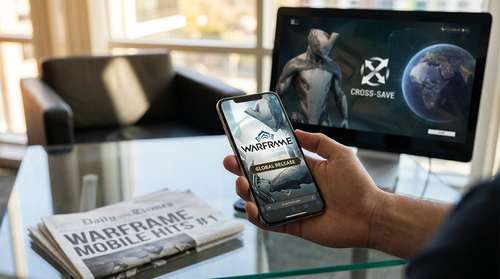
It has been a whirlwind 48 hours for Digital Extremes. Following its highly anticipated Warframe Mobile global release on Android and iOS this week, the sci-fi looter shooter has skyrocketed to the top of the charts, claiming the #1 spot on app stores worldwide. For a game that originally launched on PC over a decade ago, this resurgence is nothing short of historic. As of February 20, 2026, millions of Tenno are now taking the Origin System on the go, utilizing the game’s revolutionary cross-save technology to seamlessly carry their progress from high-end gaming rigs to the device in their pocket. If you are looking for one of the best PC and mobile games 2026 has to offer, Warframe’s pocket-sized evolution is leading the charge.
The Digital Extremes Mobile Launch: A New Era for Tenno
The road to a full mobile ecosystem has been a marathon, not a sprint. While iOS users got their first taste earlier, the Warframe Mobile global release on Android marks the final piece of the puzzle. Digital Extremes has successfully unified its player base, allowing squads to form regardless of whether members are playing on a PS5, a high-end PC, or a Samsung Galaxy S25. The launch wasn't without its nail-biting moments—a last-minute delay on February 18 due to a login loop bug threatened to stall the momentum—but developers worked around the clock to push the green light just 24 hours later.
The reception has been overwhelmingly positive. Launch metrics indicate that veteran players are driving the initial surge, eager to farm resources during their commutes. To sweeten the deal, Digital Extremes is offering the "Cumulus Collection"—including the Cirrus Armor Bundle and a 3-Day Resource Booster—to anyone who logs in before March 4. It’s a classic retention strategy that appears to be paying off in dividends, cementing the title's status as a top-tier live-service juggernaut.
Warframe Android Performance Review: Does It Hold Up?
Porting a graphics-intensive game like Warframe to the fragmented Android ecosystem is an ambitious technical feat. Our initial Warframe Android performance review suggests that the port is surprisingly robust, provided you have the hardware to back it up. The game demands at least Android 12.0, 4GB of RAM, and a 64-bit ARM64 processor. On flagship devices, the game runs at a buttery-smooth 60FPS, capturing the frenetic speed that fans love. Particle effects from Warframe abilities look stunning on OLED screens, though this visual fidelity comes at a cost: battery drain is significant, and phones can get noticeably warm during extended open-world sessions in the Plains of Eidolon.
Mastering Warframe Mobile Touch Controls
The biggest hurdle for any mobile shooter is usability, but the Warframe mobile touch controls are a cut above the competition. Recognizing that the game’s complex "bullet jumping" parkour system is hard to execute on glass, the developers introduced a "Unified Movement" option. This feature consolidates jumping, crouching, and bullet jumping into a single, context-sensitive button. While purists can stick to the legacy layout, the unified system makes traversing levels far less cramping for your fingers. Additionally, an aggressive auto-fire toggle helps mitigate the lack of tactile feedback, letting players focus more on movement and ability usage than precise aiming.
Warframe Cross-Save PC Guide: How to Link Your Accounts
The "secret sauce" of this launch is undoubtedly the cross-platform progression. However, the process can be intimidating for first-timers. If you want to link Warframe PC account to mobile without losing your precious Platinum or Prime gear, follow this essential Warframe cross-save PC guide.
First, navigate to the official Warframe website and log in to your primary account—this is usually your PC account with the most progress. Go to the "Account Management" section and look for the "Cross Platform Save" option. You will need to creating a "Cross Platform Save Account" which acts as the master file. Crucially, you must select your PC account as the 'Primary' account. If you accidentally select a fresh mobile account as primary, it could overwrite your years of progress. Once the PC account is designated as the primary, simply choose "Link Account" and sign in with your Apple or Google Play credentials. Your inventory, Warframes, and quest progress will instantly sync to your mobile device.
Why Warframe is One of the Best PC and Mobile Games of 2026
As we settle into 2026, the line between platform-specific experiences is blurring. Warframe is setting the standard for what players should expect: a unified, high-fidelity experience that respects your time regardless of where you play. With a Nintendo Switch 2 version rumored to be on the horizon later this year, Digital Extremes is aggressively expanding its footprint. The sheer volume of content—over a decade’s worth of story quests, hundreds of weapons, and deep customization—makes it an unmatched value proposition in the free-to-play market. For now, whether you are a Founder from 2013 or a new recruit just waking up from cryosleep, there has never been a better time to jump into the Origin System.