Following its landmark arrival on Sony's console this April 2026, players are clamoring for the best Starfield PS5 tips to navigate Bethesda's massive sci-fi RPG. Bundled with the massive Free Lanes update and the Terran Armada DLC, this isn't just a simple port. The $49.99 PlayStation 5 release radically transforms how you explore the galaxy, offering a smoother, more tactile experience.
Whether you are stepping into the Frontier for the first time or returning after a stint on Xbox, the 2026 iteration demands a fresh approach. From dialing in the optimal Starfield PS5 Pro settings to optimizing your controller feedback, here is everything you need to conquer the cosmos.
Starfield PS5 Performance vs Quality: Which to Choose?
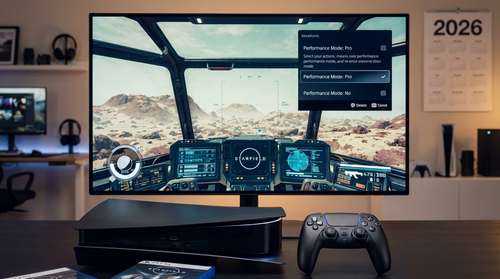
If you upgraded to Sony's mid-generation console, the debate of Starfield PS5 performance vs quality is the first hurdle you face. Bethesda optimized the PS5 Pro version using PlayStation Spectral Super Resolution (PSSR) upscaling, giving you two distinct modes that fundamentally change the feel of combat.
Pro Visual Mode locks the game at a 4K rendering output targeted at 30 FPS. It maximizes lighting, shadow fidelity, and crowd density. If you want jaw-dropping screenshots of neon-soaked Neon or the sprawling landscapes of New Atlantis, this is your pick. However, for sheer playability, Pro Performance Mode is the undeniable winner. Targeting a buttery smooth 60 FPS, the performance mode makes ground firefights and dogfights dramatically more responsive.
A few early adopters have reported occasional crashes when running unlimited frame rates in heavy areas. If your console starts running hot during extended sessions, you might want to switch to the locked 60 FPS cap or briefly disable PSSR upscaling to maintain stability.
Mastering Starfield DualSense Adaptive Triggers Settings
Bethesda went all-in on PlayStation hardware features, making the Starfield DualSense adaptive triggers settings a massive immersion booster. By default, the L2 and R2 buttons output physical resistance that mimics the kickback of your specific weapon type. Firing a heavy ballistic shotgun feels distinctly punchier than the rapid, smooth pull of a laser rifle.
To get the most out of these haptics, head into the controller settings. If you find the default trigger resistance fatiguing during long shootouts against the rogue robot armies in the Terran Armada DLC, lower the intensity slider to 50%. This gives you the tactile feedback without wearing out your index fingers.
Touchpad Shortcuts and Light Bar Integration
Don't ignore the other controller enhancements. Swiping the touchpad acts as a shortcut for your menus. Swipe up for Skills, left for Inventory, and right to pull up the map. Meanwhile, the Light Bar dynamically shifts from white to pulsing red as your ground health or ship hull integrity drops, serving as a lifesaver when your eyes are glued to the crosshairs.
Starfield Early Game Guide 2026: Fast Leveling Paths
Navigating the galaxy requires a solid foundation, making a reliable Starfield PS5 leveling guide essential. The April 2026 Free Lanes update introduced X-Tech, a brand-new crafting material used to roll legendary modifiers on your gear. The fastest way to level up and stockpile X-Tech early on is by utilizing the new Cruise Mode.
Instead of relying purely on fast-travel menus, hold L1 to activate Cruise Mode and manually fly between planets within a star system. You will encounter random space battles, derelict freighters, and Terran Armada Incursions. Engaging with these dynamic encounters grants massive chunks of XP and high-tier loot you would otherwise miss. Furthermore, while your ship is on autopilot, you can press Circle to leave the cockpit and use your workbenches to craft gear mid-flight.
If you're following a Starfield early game guide 2026 playbook, your immediate goal should be joining the Vanguard in New Atlantis. The introductory flight simulator mission is a safe, repeatable way to grind Piloting skill ranks without risking your actual ship. Once you complete your probation mission, you gain access to Vanguard ship modules, which are some of the most cost-effective weapons and shields in the game.
Best Early Skills to Prioritize
For your initial skill points, prioritize Boost Pack Training and Piloting. You cannot use your jetpack at all until you invest that first point, and leveling Piloting allows you to hijack and fly class B and C ships you encounter out in the black.
Unlocking Starfield Settled Systems Secrets
With the integration of manual space flight, hunting down Starfield Settled Systems secrets is more intuitive than ever. You no longer have to stare at loading screens to hop between moons. Keep your sensors peeled for the newly added Anchorpoint Station located in the Algorab system, which houses unique quests and vendors selling top-tier ship upgrade modules.
Exploring POIs (Points of Interest) on foot is also less tedious thanks to the Moon Jumper vehicle introduced in recent patches. Drop your vehicle from your ship, traverse the harsh terrains, and gather Quantum Essence from defeated Starborn enemies. You can now hotkey Quantum Essence directly to your Favorites menu, making it incredibly easy to pop a quick buff during intense boss fights.
Take your time, experiment with the new X-Tech crafting benches, and let the journey dictate your pace. Bethesda's universe has never felt this alive, and equipped with these strategies, you are ready to leave your mark on the stars.